
A New SDR# Panadapter Plugin Released
Marco Argilli (IU4HMY) released a plugin that turns SDR# into a live spectrum and waterfall panadapter for your transceiver, making busy bands easier to read.

A New SDR# Panadapter Plugin Released
Marco Argilli (IU4HMY), an Italian amateur radio operator, has just released a new SDR# panadapter plugin that turns the popular RTL-SDR- and Airspy-compatible program SDR# into a dedicated panadapter for your transceiver.
A panadapter essentially gives you a live, graphical view of a slice of spectrum. It shows both a real-time spectrum and a waterfall display — an extra pair of "eyes" alongside the traditional transceiver dial. That makes it far easier to spot activity, find clear frequencies, and visually navigate a busy band.
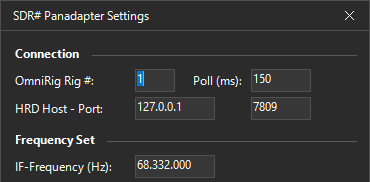
SDR# Panadapter Plugin Screenshot
How It Works and How to Connect It
Synchronization between the transceiver and SDR# is handled by OmniRig: as you tune the radio, the panadapter display in SDR# follows along. To use the plugin, you connect your SDR (RTL-SDR, Airspy, etc.) to your transceiver's IF output or antenna port, then set the receiver's IF frequency and a per-mode offset in the plugin settings. Configuration is stored in a JSON file.
Handy Band Presets
The plugin also features band presets: right-click on any preset button to store a snapshot of the current frequency, demodulation mode, and zoom level. A subsequent left-click instantly recalls that favorite spot and mode.
System Requirements and Limitations
- SDR# version: 1921 or newer
- Framework: .NET 9
- Operating system: Windows 8 / 10 / 11
Two caveats worth noting:
1. Marco recommends using center-frequency mode for the best performance.
2. Because OmniRig exposes the frequency as a 32-bit COM value, frequencies above roughly 2.1 GHz are not supported.
Licensing
The plugin does not appear to be open source, but it is free for personal and non-commercial use.
If you already own an RTL-SDR or Airspy and have been thinking about adding a big "spectrum eye" to your traditional transceiver, this plugin is well worth a look.