
New SDR# Plugin Turns SDR# into a Transceiver Panadapter
Marco Argilli's plugin turns SDR# into a live panadapter for your transceiver; it is free for personal use and needs SDR# 1921 or newer plus .NET 9.

A New SDR# Panadapter Plugin Turns SDR# into a Panadapter for Your Transceiver
Thanks to Marco Argilli (IU4HMY) for writing in and sharing the release of a new SDR# Panadapter plugin. It transforms the popular RTL-SDR- and Airspy-compatible program SDR# into a panadapter for your transceiver, giving you a live look at the band around the frequency you're tuned to.
What Is a Panadapter?
A panadapter is essentially an "external spectrum screen" bolted onto your radio:
- Live Spectrum View: Shows the full signal activity around your current tuned frequency.
- Waterfall Display: A scrolling time-history of the spectrum, so you can catch signals you just missed.
- Spot Activity Fast: Glance at the band and instantly see where the action is — far easier than tuning around by ear.
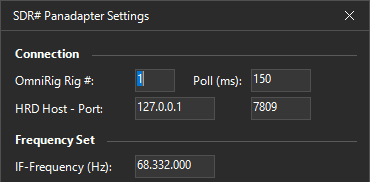
SDR# Panadapter Plugin Screenshot
Sync with Your Radio via OmniRig
Frequency synchronization between your radio and SDR# is handled by OmniRig. As you tune your transceiver's VFO, the SDR# spectrum display follows along, so the panadapter is always centered on your operating frequency.
How to Use the Plugin
- Connect your SDR to your transceiver's IF output or antenna output.
- In the plugin settings, enter the receiver's IF frequency and a per-mode offset.
- Your settings are saved to a JSON configuration file and reloaded automatically next time.
Handy Band Presets
The plugin also includes band preset buttons:
- Right-click a preset button to snapshot the current frequency + demodulation mode + zoom level.
- Click it later to jump straight back to your favorite spot on the band.
Requirements and Limitations
- OS: Windows 8 / 10 / 11.
- Software: SDR# version 1921 or newer and the .NET 9 framework.
- Performance: Marco recommends using Center Frequency Mode for the best performance.
- Frequency Ceiling: Because OmniRig exposes frequency as a 32-bit COM value, frequencies above around 2.1 GHz are not supported.
- Licensing: The plugin doesn't appear to be open-source, but is free for personal and non-commercial use.
Bottom Line
This plugin offers SDR# users a low-cost way to add a modern spectrum/waterfall panadapter view to an existing transceiver — just bring a compatible SDR receiver, and you've turned your classic radio into a visually-navigable band-scanning machine.